
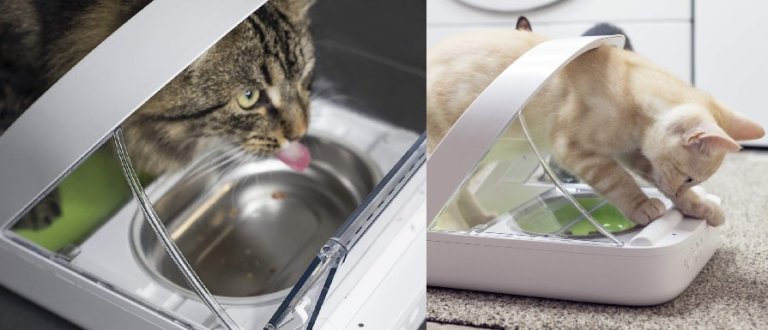
The SureFeed Microchip Pet Feeder controls access to a bowl of food. It reads a registered pet’s microchip or compatible RFID collar tag and opens the lid when that pet approaches. It is worth considering when cats share a home but need separate feeding stations. You still put the food in the bowl yourself.
Manufacturer information checked on 6 October 2026. This guide covers the standard Microchip Pet Feeder and explains the separate Connect model below. Retailer links are affiliate links; see our disclosure.
What the standard feeder offers
Sure Petcare lists a 400 ml bowl capacity, suitability for wet and dry food, and storage for up to 32 pet identities. The feeder uses four C-cell batteries and includes a low-battery indicator. The package includes a single bowl, split bowl, mat and one RFID collar tag. Check your pet’s microchip with the manufacturer’s compatibility tool before ordering.
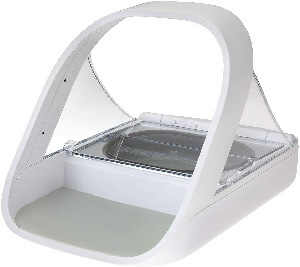
The lid closes after the registered pet moves away. The seal around the bowl helps cover the food between visits. Choose it for access control; if your main requirement is dispensing a new portion at scheduled times, compare our PetSafe feeder guide or CSF-3 setup guide.
Standard versus Connect: check the model name
The Microchip Pet Feeder Connect is a separate model with integrated scales, portion-guidance lights and feeding activity in the Sure Petcare app. The manufacturer’s Connect page says a Hub connects it to your home router. Check whether the Hub is included in a bundle or sold separately. App monitoring and built-in weighing should not be assumed when a listing says only “Microchip Pet Feeder.”
Compare the manufacturer’s standard-model specifications and Connect specifications before paying for features you need. For the existing linked Surefeed microchip listing, confirm the exact model and bundle shown by the retailer.
Introduce the feeder gradually
Follow the standard feeder’s user manual to register the intended pet while keeping other pets away. The training mode begins with the lid open and gradually introduces movement. Let your cat become comfortable at each stage before progressing; the time needed varies by pet.
In a multi-cat home, observe several meals after setup. Confirm that the right cat can enter comfortably and that another pet cannot share the opening during a visit. Registering many identities on one feeder gives those pets shared access; plan separate stations when you need to keep meals apart.
Refilling, cleaning and everyday checks
The manual recommends hand-washing the supplied bowls and mat to protect the seal, keeping food debris clear of the lid mechanism, and using good-quality alkaline C-cell batteries. Do not overfill the bowl. Keep a routine for refreshing food, cleaning and checking the low-battery light, and follow the food manufacturer’s storage instructions.

Different-coloured bowls or mats can help household members and pet sitters distinguish feeding stations. Leave clear refill instructions and identify which cat uses each bowl. That practical organisation remains useful even after the pets have learned the lid mechanism.
Buying checklist
Before ordering, check the exact model, microchip compatibility, bowl opening and overall dimensions, battery requirements, included accessories and retailer return terms. Budget for more than one unit if separate access is essential. Compare a feeder’s total setup cost with the particular problem you are trying to solve.
For broader comparisons, explore microchip feeder options. Our feeding setup guide covers the routines around an automatic feeder.