

An automatic cat food dispenser can release measured meals at set times, but the right type depends on the job. A dry-food hopper, a rotating meal tray and a microchip access bowl work differently. Start with your cat’s existing food and feeding routine, then compare the controls, cleaning and backup arrangements.
This guide explains those differences and points to manufacturer information checked for this update. Product generations and retailer listings can differ. The links include affiliate links; read the affiliate disclosure and confirm the exact model before purchasing.
Choose the mechanism before the extra features
Timed hopper: stores food above a dispensing mechanism and releases a selected amount. Check the permitted kibble shape and size, the minimum meal setting and how portions are measured. A large hopper does not remove the need to check the bowl and machine each day.
Timed meal tray: rotates or opens a compartment that you fill in advance. You measure the food yourself. Count the meals that actually open later: some five-compartment designs have one bowl available immediately and four scheduled meals.
Microchip access bowl: opens for a registered pet to help separate feeding stations. It does not automatically portion and refill the bowl. Gravity feeder: replenishes an open bowl as food is eaten, without setting meal times or dispensing a measured ration.
SureFeed: access control for a filled bowl
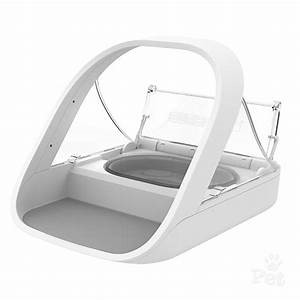
The standard SureFeed Microchip Pet Feeder listing concerns an access-controlled bowl, not a timed hopper. The manufacturer’s standard-model page describes a 400 ml bowl for wet or dry food and memory for up to 32 pet identities. You fill the bowl and introduce the lid movement gradually using its training mode.
This is a useful mechanism to consider when different pets need separate bowls. It still needs observation: the feeder cannot establish that each pet has eaten the intended amount. The Connect model adds different hardware and app features; do not assume those are included with the standard feeder. See our SureFeed model and setup guide. View the SureFeed retailer listing.
PetSafe: distinguish Smart Feed from other models

For the current Smart Feed, PetSafe specifies a 24-cup hopper, up to 12 scheduled meals and settings from 1/8 to 4 cups. App setup uses a 2.4 GHz network. Confirm the model generation, adapter and backup-battery requirements with the listing and manual.
The older links in this section use different product identifiers, so they should not be assumed to be identical bundles: view retailer listing A or view retailer listing B. Check the model number before buying. Our PetSafe feeder comparison separates Smart Feed, Simply Feed and tray designs. Check the details of listing B.
PetSafe 5 Meal: measure the food into compartments

The official 5 Meal support page describes five one-cup compartments. One is open immediately and four become available at programmed times. It uses four D batteries. View the existing 5 Meal listing.
This design suits people who want to measure each meal before loading the tray. Check the intended food type in the manual, seat the tray correctly and run a rotation test before relying on the schedule. Check the 5 Meal retailer details.
Cat Mate C500: a tray with ice packs

The Cat Mate C500 retailer listing can be compared with the current Closer Pets specification. The manufacturer describes five compartments, one immediately available and four timed, with twin ice packs and three AA batteries. The removable lid and bowl are dishwasher safe; the powered base is not a washable bowl.
Ice packs are a practical difference from an uncooled tray, but they do not establish a universal safe holding time for food. Follow the food label and feeder instructions for loading, temperature and cleaning. Compare the existing C500 listing with those requirements, then check the included parts and current retailer details.
Arf Pets: check the product code
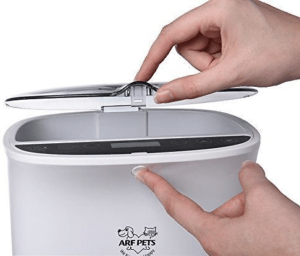
Arf Pets currently lists more than one dispenser. Its APAUF6L product page describes up to four daily meals, an included power adapter, battery operation and a recorded greeting. The separate APAFNEW2 model has its own product page. Do not transfer specifications between them.
The existing Arf Pets retailer listing should be checked against the product code and the manual supplied by the seller. Confirm the actual amount dispensed with your food rather than treating a numbered portion setting as a weight. View the retailer’s model and package details.
A model mismatch in an older retailer link
An earlier version of this article labelled the following link as Wopet, but the URL and observed destination did not match that recommendation. We cannot verify it as a Wopet product. The linked model needs checking before purchase: view the retailer listing.
The same existing retailer destination is retained for reference, with no Wopet camera, app or capacity claims attached. Consult Wopet’s model-specific support centre if you already own one of its feeders. Review the linked model before purchasing.
Older listings that need model and availability checks
The following names appeared in this guide’s earlier edition. Their current seller, exact version and support arrangements have not been established here, so they are references to verify rather than ranked recommendations. Confirm the manual, replacement parts and return terms before purchasing an older unit.
Westlink: view the existing listing. Check the model-specific power and timer instructions, including whether settings survive a loss of power. Check current listing details.
Cat Mate C3000: view the existing listing. It is a different product from the C500 tray above; do not apply C500 capacity, batteries or cleaning instructions to it. Check the C3000 model and seller details.
TD Design: view the existing listing. Verify which parts are removable and washable, the timer sequence and the permitted food type in the exact unit’s manual. Check current listing details.
PetSafe Digital Two Meal: view the older digital-model listing. Do not assume it has the same timer, batteries or capacity as the current two-meal product. Check the model and instructions.
Pawise: view the existing listing. Establish whether the linked item is a timed feeder or a gravity design before comparing meal controls. Check the current product details.
Five checks before you rely on a dispenser
1. Match the food. Check food type, kibble dimensions and whether soft or irregular pieces are permitted. Our food compatibility guide provides a practical checklist.
2. Measure test meals. Run several servings with your usual food, record the output and adjust the setting to the feeding plan you already use. Recheck after changing food. A machine setting does not decide an appropriate daily ration.
3. Test the schedule and power plan. Confirm the clock, next meal and any backup mode using the manufacturer’s instructions. For app models, check which functions continue locally when the connection is lost.
4. Make cleaning realistic. Identify the bowl, tray, chute, seals and motor base. Wash only approved removable parts, dry them fully and keep food debris out of the mechanism.
5. Keep a person responsible. Arrange daily checks and clear instructions for refilling, cleaning and a failed meal. An automatic feeder is not a substitute for care during an absence. See our feeding routine and carer handover guide.
If you prefer a separate external timer and adjustable dry-food dispenser, the CSF-3 Super Feeder guide explains that option and its setup limits.